LingoBlend

Blended books on your e-reader

For XTEINK X4 Pro, X4 Classic and readers running CrossPoint. Read a real book with some words in the language you are learning, look up the original of any underlined word, and save words to practice later.

Free to start: The Great Gatsby in English, with some words in Spanish. Blending your own books is part of Pro.

How it works

  1. Blend a book

    Pick a classic, upload a DRM-free EPUB, PDF or text file, or paste any text. Choose the language you are learning and how many words to swap.

  2. Get it on your reader

    Your connected readers list it: under My blended books in LingoBlend for XTEINK, and in the LingoBlend plugin on CrossPoint. With Pro, you can also send a blend from the LingoBlend phone app: long-press it and choose Send to my reader.

  3. Read, look up, save

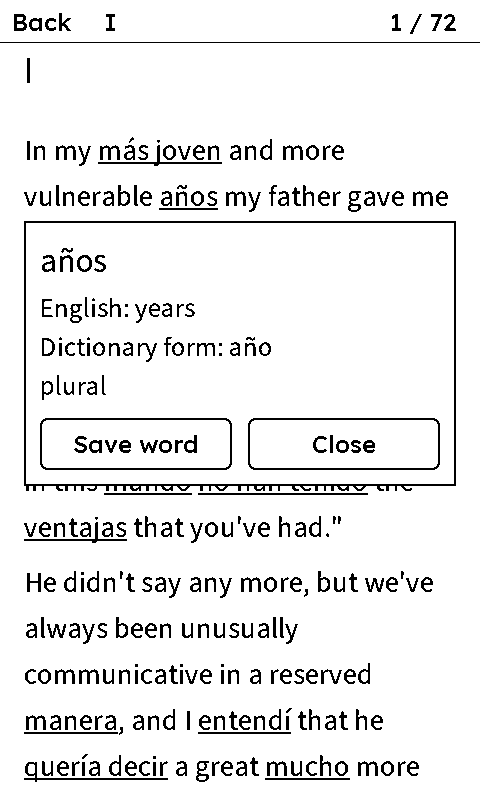
    Underlined words are in the language you are learning. Look one up to see the word it replaced, and save it: once your account is connected, it comes up in your practice in the LingoBlend phone app (on CrossPoint 2.0, after you press Sync clippings).

LingoBlend for XTEINK on an X4 Pro: a page of The Great Gatsby with Spanish words underlined, and the box for años showing English years, dictionary form año
LingoBlend for XTEINK on an X4 Pro

Choose your reader

  • XTEINK X4 Pro or X4 Classic with XTEINK's own software: use LingoBlend for XTEINK, a free app from XTEINK's app store.
  • XTEINK X4 or X3, or any reader running CrossPoint: use the CrossPoint guide.

X4 Pro and X4 Classic, XTEINK's own software

LingoBlend for XTEINK

A free app from XTEINK's app store. It reads the books itself: tap an underlined word to see the original, save it, and connect your LingoBlend account to get your own books.

  • The Great Gatsby, free, no account
  • Your own books, with Pro
  • Saved words go to your LingoBlend dictionary

The open-source reader software

CrossPoint readers

Blended books with a dictionary for your reader's own Look Up, so it shows the word each blended word replaced. CrossPoint 2.0 adds our plugins: your own books on the reader, and clipped words sent to your LingoBlend dictionary.

  • XTEINK X4, X3 and other readers that run CrossPoint
  • The free book and its dictionary, no account
  • Plugins need CrossPoint 2.0 (release candidate)

Another e-reader?

A blended book is an ordinary EPUB, so most e-readers open it. Take the Glosses above edition: it prints the original above each blended word, so you need no dictionary.

Download the free book (Glosses above)

What you get on each

LingoBlend for XTEINK

The Great Gatsby, blended, free
YesIn the app
Your own blended books (Pro)
YesUnder My blended books
Look up the original of a word
Yes
Save words to your LingoBlend dictionary
YesSyncs over Wi-Fi
Reading time towards your daily goal
YesIf you switch it on

CrossPoint

The Great Gatsby, blended, free
YesBook and dictionary
Your own blended books (Pro)
YesPlugin, Wi-Fi or USB
Look up the original of a word
YesWith the book's dictionary
Save words to your LingoBlend dictionary
Yes2.0, with a sync button
Reading time towards your daily goal
Yes2.0, if you switch it on

Other e-readers

The Great Gatsby, blended, free
YesGlosses above edition
Your own blended books (Pro)
YesAs an EPUB, no look-up
Look up the original of a word
No
Save words to your LingoBlend dictionary
No
Reading time towards your daily goal
No

CrossPoint 2.0 is a release candidate for now.

Questions

What does it cost?
LingoBlend for XTEINK, the free book and its dictionary cost nothing and need no account. Saving words to your LingoBlend dictionary needs a free account. Blending your own books is part of Pro: it includes 100,000 Smart Blend words a month, and a book uses about one for each word in it, not only the swapped ones (The Great Gatsby has 48,143).
Where do I get an account and Pro?
In the LingoBlend phone app for iPhone and Android. Create your account there, choose the language you know and the one you are learning, and subscribe to Pro if you want it. The same account works on lingoblend.app and on your readers.
Can I use more than one reader?
Yes. Every reader connected to your account lists the same books, so a book you blend reaches all of them.
What can a connected reader see in my account?
It can list and download the books you blended, add the words you save and, if you switch it on, report your reading time. It can't read your saved words, your profile or your subscription. Remove it any time in your readers list; access also ends after 12 months.
Which languages does it work with?
Your books can be in any of LingoBlend's 17 languages. On XTEINK readers, Hindi can't be shown correctly yet, and how Chinese and Japanese look depends on the reader's fonts.

Blend a book for your reader

A short book is ready in a couple of minutes and a novel in up to ten. Then it waits for you on your reader.

Blend a book

Blending your own books is part of Pro, which you get in the LingoBlend phone app. The free book needs nothing.

Get the LingoBlend phone app