 LingoBlend
 now runs on XTEINK's own software. LingoBlend for XTEINK is a small app for the X4 Pro and X4 Classic, published in XTEINK's app store, that does the whole job on the reader: it downloads a blended book, reads it with you, explains any underlined word where it stands, and keeps the words you want to learn. Until now, looking up a blended word on an X4 Pro or X4 Classic meant replacing its software with CrossPoint. With the app, the reader keeps XTEINK's own software.
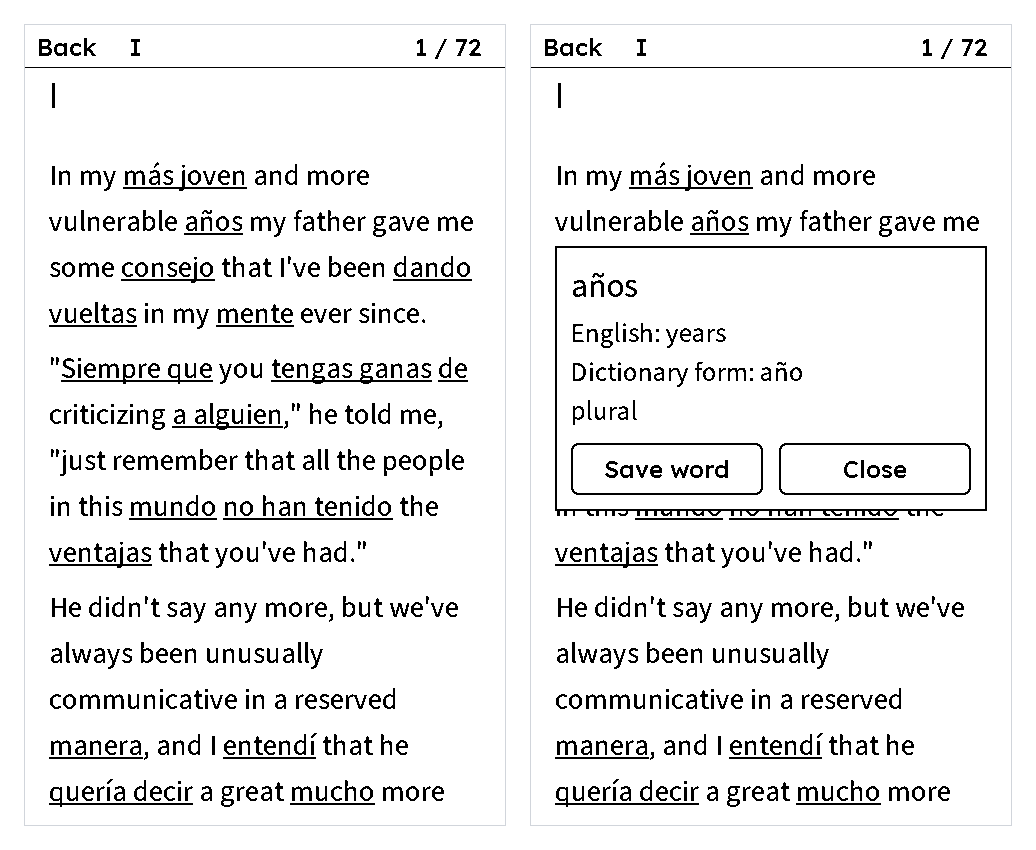
What a blended book is#
A blended book is an ordinary novel with a share of its words swapped into the language you're learning: one in five in the free book, anywhere from 5% to 50% in your own. Each one is picked so that the sentence around it still tells you what it means. You read in a language you know and meet the new one where the context does most of the work. When a word stops you, you look it up; when it's worth keeping, you save it. The overview of blended books on e-readers covers the idea and the other readers it works on.
What the app does on the reader#
LingoBlend for XTEINK is the whole loop in one place. It downloads books over Wi-Fi and reads them itself, in three text sizes. You use it by touch on the X4 Pro and with the buttons on the X4 Classic. Blended words are underlined. Tap one and a box opens with the word it replaced and, for many words, its dictionary form and a short grammar note. That box comes from the book itself, so it works with Wi-Fi off. Save word keeps the word in My words. To save a word that isn't underlined, press and hold it; on the X4 Classic, press OK, move to it with Left or Right, and press OK twice.
| With | What you get | What it needs |
|---|---|---|
| No account | The app, The Great Gatsby (English, with one word in five in Spanish), looking words up and saving them on the reader | XTEINK's app store |
| A free LingoBlend account | Saved words sent to your LingoBlend dictionary and its practice, and, if you switch it on, reading time towards your daily goal | An account created in the LingoBlend phone app, with your two languages chosen |
| Pro | Your own books: a classic, a DRM-free EPUB, PDF or text file, or text you paste, in any of 17 languages, with 5% to 50% of the words swapped | Pro, from the same monthly allowance as Smart Blends in the LingoBlend phone app |
Which reader you need#
The app needs an XTEINK X4 Pro or X4 Classic running XTEINK's own software, updated to the latest version, and a Wi-Fi network. On the XTEINK X4 and X3, blended books work through CrossPoint, the open-source reader software, as they do on any reader you've already moved to CrossPoint.
| Your reader | Use |
|---|---|
| X4 Pro or X4 Classic with XTEINK's own software | LingoBlend for XTEINK, set up below |
| X4 Pro or X4 Classic with CrossPoint installed | The CrossPoint guide |
| XTEINK X4 or X3 | The CrossPoint guide |
| Kobo, PocketBook and other EPUB readers | The glosses above edition of the free book, as a plain EPUB |
Not sure which way suits you? XTEINK's own software or CrossPoint puts the two side by side.
Set it up#
- Link your reader to XTEINK. XTEINK's app store installs apps on readers linked to an XTEINK account. On the reader, open the menu (≡) → Settings → Log In to Account, and scan the code with XTEINK's phone app.
- Install LingoBlend. On your phone or computer, open XTEINK's app store, sign in with the same XTEINK account, find LingoBlend, choose Install, pick your reader and choose Push. On the reader, open ≡ → Cloud, choose the LingoBlend package and confirm Install this package?.
- Open it. ≡ → Ink App → LingoBlend. The first time, it connects to Wi-Fi, which can take up to 30 seconds.
- Read the free book. Choose The Great Gatsby, then Download and Read.
- Look up and save. Tap an underlined word, and Save word keeps it. On the X4 Classic, press OK to choose a word, move with the buttons, and press OK to open it.
The XTEINK guide has every step, the X4 Classic's buttons spelled out, and screenshots of the app.
Your own books#
The free library is one book today. Your own books, with Pro, come from lingoblend.app/reader: pick a classic, upload a DRM-free EPUB, PDF or text file of up to 10 MB, or paste any text, choose the language you're learning and how much to blend. A classic or an uploaded book over 60,000 words is blended a part at a time: you choose a range of chapters of up to 60,000 words, and each part is its own book on your reader. Pasted text can be up to 60,000 words. You can also send a blend you made in the LingoBlend phone app: long-press it and choose Send to my reader.
When it's ready, open LingoBlend on the reader and go to My blended books → the book → Download. Not listed yet? Choose Refresh. Every reader connected to your account lists the same books, including a CrossPoint reader signed in with the LingoBlend plugin, which needs CrossPoint 2.0, a release candidate for now. Pro includes 100,000 Smart Blend words a month. A book uses about one for each word in it, not only the swapped ones, so a 50,000-word novel uses about 50,000; sending a blend from the LingoBlend phone app uses none.
Your words, in your practice#
Connecting your account is optional, and it's what turns saved words into practice. Create a free account in the LingoBlend phone app first and choose the language you know and the one you're learning. Then, in LingoBlend on the reader, choose Account → Connect, scan the code with your phone or type it at lingoblend.app/pair, and approve.
From then on, the words you save go to your LingoBlend dictionary by themselves: at once if the reader is on Wi-Fi, otherwise the next time you open LingoBlend for XTEINK with Wi-Fi in range. Words from a book blended into a language you aren't learning in LingoBlend stay on the reader. A blended word keeps the meaning it had in the book. In the LingoBlend phone app, the words come up in the spaced-repetition games like any other word you've saved. My words on the reader shows each one, and Sync now sends them straight away. To count reading time towards your daily goal, switch on Count reading time for the reader in your readers list on lingoblend.app. On an X4 Pro you can review them on the reader too: link Flashcards, the free XTEINK app powered by LingoBlend, to the same account, set it to the same two languages, and it studies the words you save here, as read and review on your XTEINK explains.
What the reader can and can't see#
A connected reader can list and download the books you blended, add the words you save and, if you switch it on, report your reading time. It can't read your saved words, your profile or your subscription. You can remove it at any time, and access ends by itself after 12 months. The post on what a paired reader can and cannot see covers the same limits for a CrossPoint reader.
Where this honestly stands#
We test on an X4 Pro. The X4 Classic runs the same app with its buttons, and we checked it in XTEINK's own simulator. The free library has one book today, The Great Gatsby with Spanish. On XTEINK readers, Hindi can't be shown correctly yet, because its letters aren't joined, and how Chinese and Japanese look depends on the reader's fonts. Everything else in this post works today.